

Run your campus on one system. Not six spreadsheets.
Connect people, academics, administration, communication and campus operations in one platform designed around how education institutions actually work.
For schools, colleges, universities and school groups
Where campus time quietly disappears.
Records that don't reconcile
Attendance in one notebook, fees in another, marks in a third. Nothing matches without someone retyping it.
Fee recovery eats office time
Calling parents one by one for overdue vouchers, then updating a spreadsheet every month.
Parents find out last
By the time a report card reaches home, the term is over and the chance to act has passed.
Leaders wait for reports
Numbers arrive as a monthly PDF instead of a live view — too late to change anything.
One login instead of five disconnected registers.
- Paper registers and separate spreadsheets
- Manual fee follow-up calls
- Report cards typed by hand
- Printed notices that arrive late
- Each branch managed separately
- One record per student, used everywhere
- Automatic reminders and reconciliation
- Report cards generated from the gradebook
- WhatsApp and SMS updates sent automatically
- One live dashboard across every campus
One student record, from enquiry to alumni.
Information is entered once and flows through every stage — no re-entry between departments.
- 01
Admission
Applications screened and ranked against your criteria.
- 02
Enrolment
Programs, classes, sections and batches assigned.
- 03
Attendance
Biometric, RFID or app check-ins sync automatically.
- 04
Fees
Vouchers, reminders and reconciliation.
- 05
Exams
Scheduling, marking and award lists.
- 06
Results
Report cards and transcripts generated.
- 07
Promotion
Calculated against the rules you set.
Every department, one login.
What a school needs, what a college needs and what a university needs — without twelve different vendors.
Admissions
Applications auto-screened, ranked and short-listed against your criteria.
Students
One record per student across programs, classes, sections and batches.
Attendance
Biometric, RFID or app check-ins sync automatically — no register, no re-entry.
Fees & payments
Vouchers, reminders and wallet, bank and card reconciliation.
Exams & gradebook
Schedule and grade exams; generate report cards and transcripts.
Academics & LMS
Assignments, recorded lectures and live classes for every cohort.
HR & payroll
Staff attendance, leave, payroll and increments without spreadsheets.
Finance
Budgets, ledgers, expense tracking and P&L across every campus.
Parent, teacher & student apps
Each role gets exactly what they need — nothing buried in menus.
Multi-campus dashboard
One view across every branch, with drill-down.
Smart campus cards
Student, staff, library and transport cards from one record.
WhatsApp & SMS alerts
Attendance, fee due dates and results sent where parents read them.
Each role gets what they need.
Visibility and control across campuses
- Live enrolment, collection and attendance across every branch
- Outstanding fees by age, not just a total
- One standard way of working across campuses
The screens your teams will use.
Actual Schoolage screens, shown with demonstration data.

See what needs attention before it becomes a bigger problem.
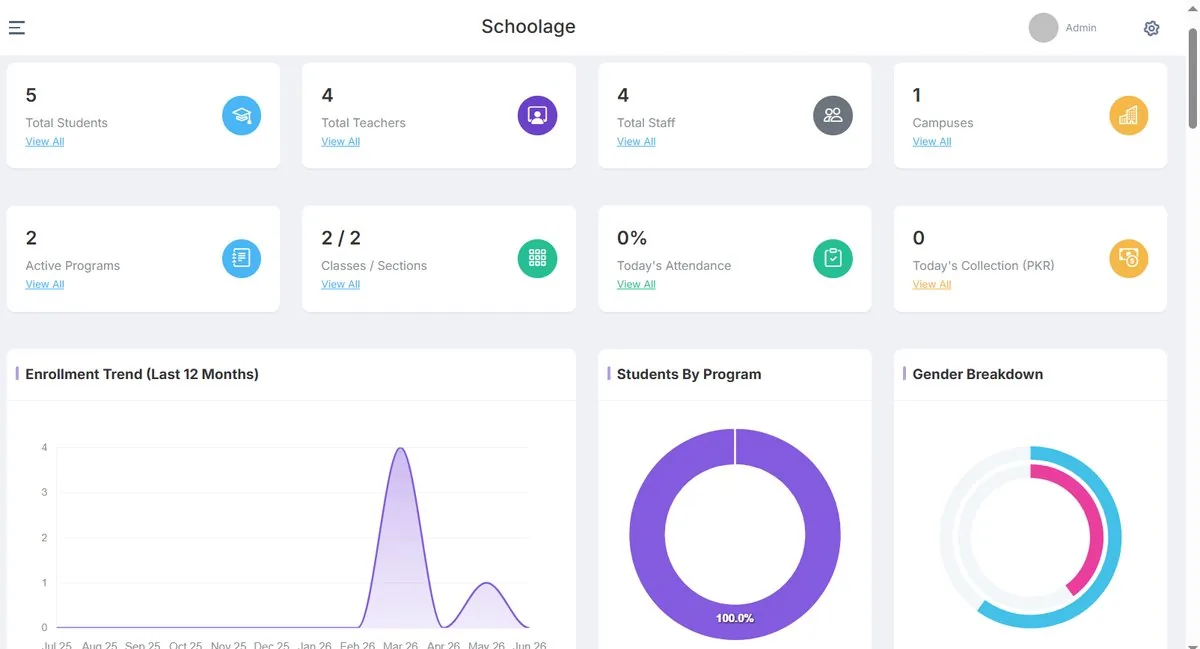
Students, teachers, staff, campuses, today's attendance and today's fee collection on one screen, with enrolment trends and program mix underneath.
The AI in Schoolage actually does something.
Not a chatbot bolted onto a database — AI built into the jobs that quietly cost a campus the most time. People review and decide.
Dropout-risk flags, before mid-terms
Attendance dips, late fees and falling grades are cross-checked so the office can step in early.
Report cards that write themselves
Marks roll up into formatted, board-ready report cards and transcripts.
Timetables that resolve their own clashes
Teacher load, room capacity and subject rules balanced when something changes.
A parent assistant on WhatsApp
Routine parent questions answered instantly, any time.
Every branch on one system, one view for leadership.
Each campus runs its own day-to-day, while owners and group leaders see enrolment, attendance, collection and results across all of them — and drill into any one.
- Shared academic calendar across campuses
- Standard processes, local flexibility
- Group-level and campus-level reporting
Access follows the role, not a shared password.
- A teacher sees their own classes
- A parent sees their own child
- Finance sees fees; HR sees staff
- Leadership sees across campuses
Reports generated, not assembled.
Dashboards for leaders update as work happens. Formal reports for boards, HEC and accreditation visits are produced in the formats they ask for.
- Live dashboards for owners, principals, deans and registrars
- Fee aging, attendance and exam progress views
- Board, HEC and accreditation-ready report formats
- Enrolment trend by program
- Outstanding fees by aging bucket
- Absent-since by class
- Staff hiring & resignations
Parents who stay informed — automatically.
Attendance, fee due dates, notices and results are sent where parents actually read them, the moment they happen.
- WhatsApp as the default channel, with SMS
- Parent, teacher and student apps
- Routine questions answered by the WhatsApp assistant
HR strong enough to run the whole institution.
From hiring a new teacher to processing a retirement — one system, not three separate tools.
Talent acquisition
Attract, hire and onboard teaching and non-teaching staff.
Talent management
Integrate staff into the institution and manage their journey.
Payroll & workforce
Automate payroll and manage the workforce from one platform.
Connected to what you already use.
Every integration shows its real status — we only claim what works today.
Global integrations
Available to institutions in any region.
WhatsApp notifications
Attendance, fee reminders, notices and results sent where parents already read messages.
SMS alerts
Fallback and high-priority alerts to any mobile number.
Role-based mobile apps
Parent, teacher and student apps reading from the same records.
Biometric attendance devices
Check-ins sync automatically — no register, no re-entry.
RFID smart cards
Student, staff, library and transport cards from one record.
Bank transfer reconciliation
Fee payments matched against vouchers automatically.
Card payment reconciliation
Card payments reconciled into the same fee ledger.
Regional integrations
Built for specific countries and their payment and reporting systems.
JazzCash
Mobile-wallet fee payments with automatic reconciliation.
Easypaisa
Mobile-wallet fee payments with automatic reconciliation.
Board & HEC report formats
Report formats aligned to board, HEC and accreditation requirements. Reports, not a direct system connection.
Custom integrations
Scoped with your IT team during discovery. Listed by category — we don't imply partnerships we don't have.
Single sign-on & identity providers
Connect institutional identity so staff and students use existing accounts.
Video & collaboration tools
Link live classes and meetings to timetables and cohorts.
Accounting systems
Share fee, payroll and ledger data with your finance system.
Learning platforms & content
Connect external LMS or content libraries to academic structures.
Data warehouses & BI
Move institutional data into existing reporting tools.
Government & regulatory systems
Submission formats and connections for national or regional systems.
APIs & webhooks
Programmatic access scoped with your IT team — ask about current availability.
Regional payment gateways
Local gateways outside the regions above, scoped per project.
Status labels: Available — works today. Integration Ready — supported, configured per institution. Custom Integration — scoped and built during implementation. Coming Soon — planned, not yet available. Names of third-party products are used only to describe compatibility and do not imply partnership or endorsement.
Already using another system? You don't have to start from zero.
Student records, fee history and staff data are migrated from spreadsheets or your previous system by our onboarding team as part of setup.
Nothing is thrown away — we keep a backup of your originals so nothing is lost in the switch.
- Data mapping from your current fields to Schoolage
- Migration plan agreed before anything moves
- Students, staff and users migrated with the right roles
- Academic structure set up: programs, classes, sections, batches
- Validation with your team before go-live
- Integration planning and launch support
Includes data migration and role-based staff training.
- Single campus2–4 weeks
- Multi-campusScoped in discovery
- UniversityScoped in discovery
A clear path from decision to adoption.
- 01
Discover
Understand your structure, current workflows, boards or accreditation requirements, and priorities.
- 02
Configure
Set up campuses, academic structures, users, roles and workflows around how you actually work.
- 03
Integrate
Connect payments, messaging, devices and other systems where required.
- 04
Prepare
Migrate and validate data, and train each team on their own role — not a tour of the whole system.
- 05
Pilot
Validate workflows with the people who will use them, where it makes sense.
- 06
Launch
Go live with support through your first billing or exam cycle.
- 07
Improve
Review adoption together and identify the next improvements.
The people who will get you live.
Implementation lead
Owns your plan from discovery to launch, and is your single point of contact.
Data & migration specialist
Maps, moves and validates your records with your team.
Training & adoption
Trains each role on what they need, and reviews adoption after go-live.
Questions institutions ask
How long does implementation take?
Most single-campus schools are live in 2–4 weeks, including data migration and staff training. Multi-campus and university rollouts are scoped individually during discovery.
Can we migrate our existing data?
Yes — student records, fee history and staff data from spreadsheets or another system are migrated by our onboarding team as part of setup, and we keep a backup of your originals.
Can it support multiple campuses?
Yes. Each campus runs on the same system, and leadership gets one view across every branch with drill-down to campus level.
Can different users get different permissions?
Yes. Access is role-based: a teacher sees their classes, a parent sees their child, finance sees fees, and leadership sees across campuses.
Will our teachers and staff receive training?
Yes. Training is role-specific — a front-desk admissions officer learns what they need, not the whole system. Most staff are comfortable within their first week of daily use.
How is our data handled?
Student and financial data is encrypted at rest and backed up regularly, access is role-based, and hosting is configured to match the data-residency requirements of your institution or board. Final security architecture is confirmed with your IT team before go-live.
Can we start small and expand?
Yes. Many institutions start with the operations they need most and add modules, campuses or solutions later. Terms are confirmed during your demo based on campus size and modules.
Is there a long-term contract?
Terms are confirmed during your demo based on your campus size and the modules you choose.
Can it integrate with our existing systems?
Payments, WhatsApp and SMS, biometric and RFID devices are available today. Identity, accounting, learning platforms and other systems are scoped as custom integrations with your IT team. See the Integrations page for current status.
See Campus ERP on your own workflows.
A 30-minute walkthrough mapped to your admissions, fees and attendance — not a generic deck.